7. Boosting, Neural Networks, and AutoML
Once the workflow is sound, it becomes reasonable to compare stronger model families. The key is to treat them as tools with trade-offs, not as automatic upgrades.
Learning goals
- understand what boosting adds beyond bagging
- build intuition for neural networks on tabular problems
- use AutoML without outsourcing judgment
Boosting
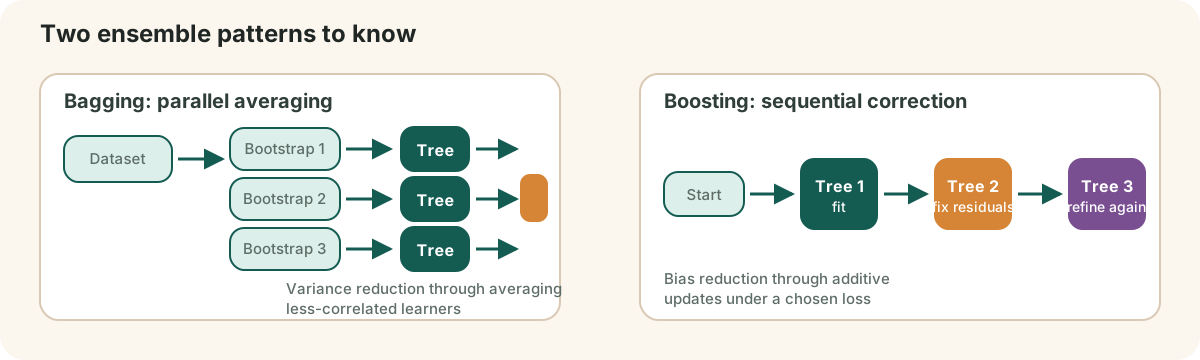
Boosting builds models sequentially. Each new learner focuses more attention on errors made by earlier learners.
In additive form, a boosting model often looks like:
where
That differs from bagging:
- bagging reduces variance through averaging
- boosting reduces error through staged correction
This often makes boosting very strong on structured datasets, especially when feature quality is already decent.
In practice, gradient boosting libraries are among the most reliable high-performance choices for tabular data.
Neural networks
Neural networks stack layers of weighted transformations and nonlinear activations. They can represent more flexible functional forms than linear models and can capture rich interactions among features.
A single layer update is usually written as:
Still, tabular data is a domain where neural networks are not always the default winner. They can be effective, but they often demand more care in:
- optimization
- regularization
- architecture choice
- data volume
That is why many applied tabular workflows compare trees and neural models rather than assuming one dominates.
Training ideas worth knowing
Even at a conceptual level, it helps to know these ideas:
- forward pass: compute predictions from inputs
- loss function: measure error
- backpropagation: distribute learning signal backward through the network
- dropout and regularization: reduce overfitting
- activation functions: introduce nonlinearity
The goal here is fluency, not memorizing every equation.
AutoML
AutoML systems can automate pieces of:
- preprocessing
- model selection
- hyperparameter tuning
- evaluation bookkeeping
That can speed up iteration dramatically, especially for benchmarking or for teams with limited ML bandwidth.
But AutoML still depends on human decisions about:
- target definition
- leakage control
- split strategy
- metric choice
- deployment constraints
AutoML is most useful when you already know what a valid workflow looks like.
Representative AutoML libraries
If you want concrete tools to try, a useful starting set is:
- AutoGluon Tabular, when you want a strong tabular baseline quickly with modern ensembling and a relatively simple user experience
- FLAML, when you want a lighter-weight and time-budget-aware AutoML workflow that can fit well into Python experimentation loops
- auto-sklearn, when you are already working in the scikit-learn ecosystem and want an AutoML layer that stays close to that style of workflow
- H2O AutoML, when you want a broader leaderboard-style AutoML system with stacked ensembles and a more platform-oriented workflow
The point of learning these libraries is not to memorize tool names. It is to understand what they automate well, where they still need supervision, and how they compare against your manual baselines.
In practice, that comparison should include not only other AutoML systems but also strong hand-tuned or well-tuned tree baselines such as CatBoost, LightGBM, XGBoost, and random forests.
| Library | What it automates well | Good first use case | Watch-out |
|---|---|---|---|
| AutoGluon Tabular | strong default ensembling and tabular baselines | quick high-quality benchmark on structured data | can hide a lot of modeling detail if you do not inspect outputs |
| FLAML | lightweight budget-aware search | time-constrained experiments inside Python workflows | smaller search scope can miss richer ensembles |
| auto-sklearn | sklearn-adjacent model and pipeline search | teams already invested in sklearn-style pipelines | can be slower and heavier than expected on larger problems |
| H2O AutoML | broad leaderboard-style search and stacked ensembles | platform-like comparisons across many models | operational workflow can feel more heavyweight than notebook-first tools |
For a live comparison point, see the TabArena leaderboard. As of March 14, 2026, on its public no-imputation / lite / all-tasks / all-datasets board, RealTabPFN-v2.5 (tuned + ensembled) is listed first at Elo 1648, AutoGluon 1.4 (extreme, 4h) is next at 1640, and strong tuned-plus-ensembled tree baselines like LightGBM (1440), CatBoost (1414), and XGBoost (1387) remain highly competitive. That is a good reminder that foundation models, AutoML systems, and classic tree methods should all be part of the same comparison set.
Practical model-comparison mindset
For a serious tabular project, a healthy comparison set might include:
- a simple linear or logistic baseline
- a tree ensemble baseline
- a boosting model
- optionally a neural network or AutoML run
The winning choice should reflect more than score alone. Also consider robustness, latency, interpretability, maintenance burden, and how likely the result is to survive contact with real data drift.
| Candidate | Typical upside | Typical risk |
|---|---|---|
| linear or logistic regression | fastest interpretable baseline | underfits nonlinear interactions |
| random forest | forgiving strong baseline | can be less sharp than boosting on tabular leaderboards |
| gradient boosting | often strongest classical tabular performer | easier to overfit through tuning |
| neural network | flexible architecture for larger or multimodal setups | more tuning, data, and optimization sensitivity |
| AutoML | broad benchmark quickly | still inherits your split, metric, and leakage mistakes |
Chapter takeaway
Advanced models are worth using when they solve a real problem better, not when they merely sound more modern.
Practice
For one prediction problem, rank these in the order you would try them:
- linear or logistic regression
- random forest
- gradient boosting
- neural network
- AutoML
Explain the order in one paragraph.